Thermly
App StorePrint anything to a thermal receipt printer from your iPhone: tasks, notes, receipts, whatever you need on paper.
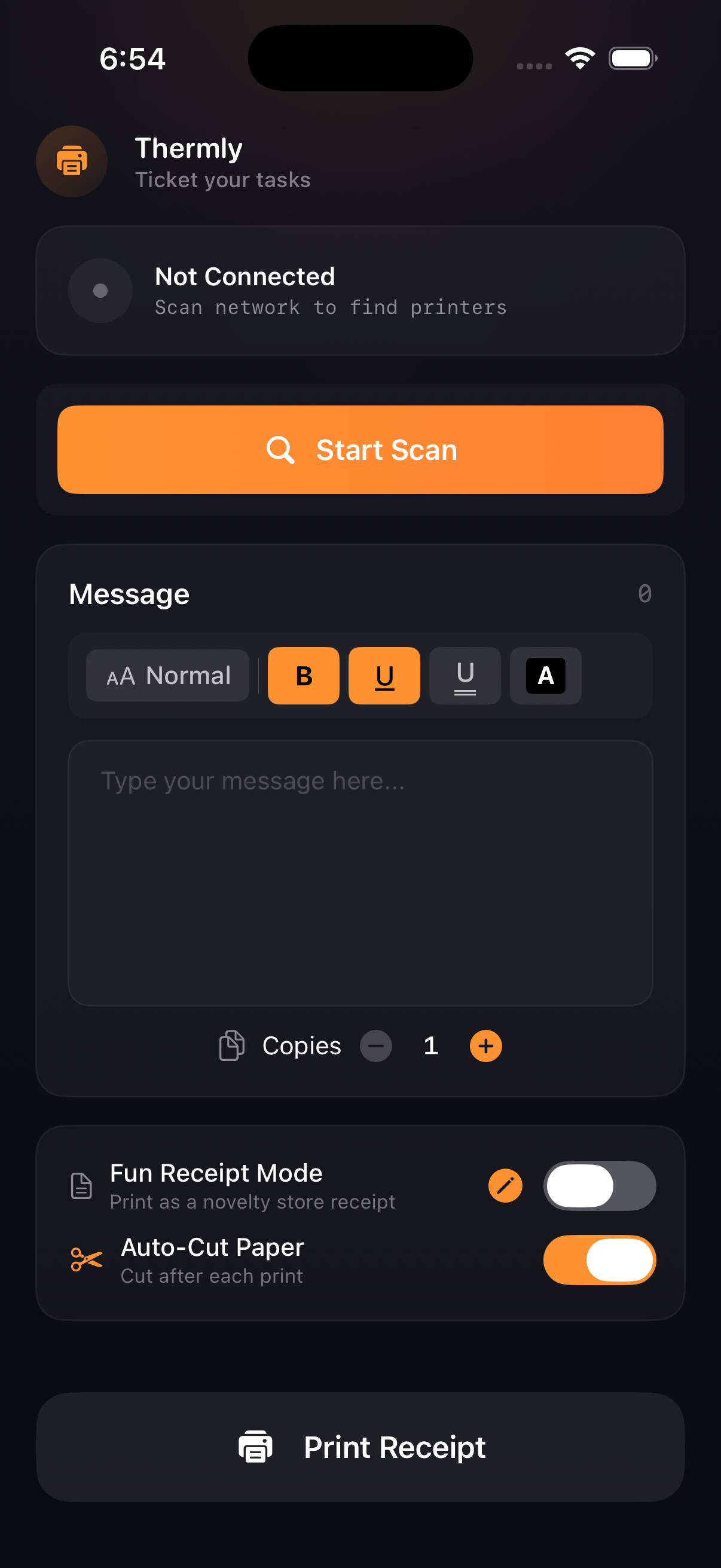
Thermly connects to Epson thermal receipt printers over your local Wi-Fi. Scan the network to discover printers, compose a message with formatting options (bold, underline, font size, inverted text), preview it, set the number of copies, and print. Fun Receipt Mode turns your message into a customizable receipt template: store name, tagline, address, phone, thank-you line, footer, optional tax and bonus line items, a QR code of your message with size control, and optional auto-cut after each print.
Ticket your tasks.
What I built
- Local network scanner that discovers Epson ePOS-compatible printers on your Wi-Fi
- Message composer with formatting: bold, underline, double underline, inverted text, font size
- Live preview showing how the message will look before printing
- Copy count control
- Fun Receipt Mode. It turns any message into a branded receipt with store name, tagline, address, thank-you message, footer, optional tax display, and fun bonus line items
- QR code printing, with your message embedded in a QR code printed on the receipt and size control
- Auto-cut, and it automatically cuts paper after each print job
- All settings stored locally. No accounts, no cloud
Origin
I saw a video where someone was using a receipt printer to manage their tasks, printing each item on its own slip of paper so they could physically tear it off when done. It was the most satisfying productivity system I'd ever seen. I built Thermly so anyone with a thermal printer could do the same thing.
Technical approach
Architecture
MVVM with a clear separation of concerns. PrinterDiscovery handles network scanning as an @Observable class pinned to @MainActor. PrinterManager coordinates connection state and print jobs. ESCPOSPrinter is implemented as a Swift actor for fully thread-safe printer communication. Views hold no business logic.
Printer communication
Built a custom ESC/POS implementation from scratch using Apple's Network framework directly, with no third-party printer SDK. ESCPOSPrinter constructs raw byte arrays for every command: text formatting (bold, underline, double underline, invert), text sizing, QR code generation, paper feed, and auto-cut. Each command maps to the exact ESC/POS hex sequences the hardware expects.
Network scanning
PrinterDiscovery detects the local subnet by walking getifaddrs() across interface prefixes (en0, en1, bridge), falling back to private IP range detection. The scanner then iterates all 254 host addresses in batches of 50 using withTaskGroup, opening a raw TCP connection to port 9100 per address with an 0.8-second timeout. Progress updates stream back to the UI in real time via @Observable.
QR code printing
QR codes are generated entirely via ESC/POS GS ( k commands sent as raw bytes, with no image framework involved. Sets Model 2 format, error correction level M, configurable size (1 to 16), stores the UTF-8 content data, and triggers print, all through the byte protocol.
Persistence
ReceiptSettings and PrintSettings are Codable structs persisted to UserDefaults via JSONEncoder/JSONDecoder. No Core Data needed. The data model is simple and flat.
Concurrency
The printer actor isolates all socket operations. PrinterDiscovery and PrinterManager are @MainActor-bound @Observable classes, keeping UI updates on the main thread without manual DispatchQueue.main calls. Swift 6 strict concurrency compliance throughout.
Technical challenge
The hardest part was building the network scanner fast enough to feel responsive. Scanning 254 addresses sequentially would take minutes. My solution: batch the subnet into groups of 50, then scan each batch concurrently using withTaskGroup. Each task opens a raw TCP connection to port 9100 and resolves in under 0.8 seconds either way. The tricky part was subnet detection. I couldn't rely on a single interface name, so I walk getifaddrs() in priority order: first looking for en-prefixed interfaces (Wi-Fi), then bridge interfaces, then falling back to any private IP range (192.168.x, 10.x, 172.x). If none of those resolve, the scan fails fast with a clear error rather than silently scanning the wrong range.
What I'd change
The ESCPOSPrinter actor grew larger than I intended. It handles connection management, raw byte sending, receipt layout, and QR code generation all in one place. I'd extract the receipt formatting into a dedicated ReceiptBuilder type that returns a [UInt8]payload, keeping the actor focused purely on sending data over the socket. I'd also add unit tests around the ESC/POS command construction. The byte sequences are critical to get right and currently there's no automated verification that, say, the QR size command produces the correct 7-byte header.
Links